Pages

Tampilkan postingan dengan label tools. Tampilkan semua postingan

Kamis, 26 Mei 2016

14 Most Important Tools to Learn in Adobe Illustrator for Beginners

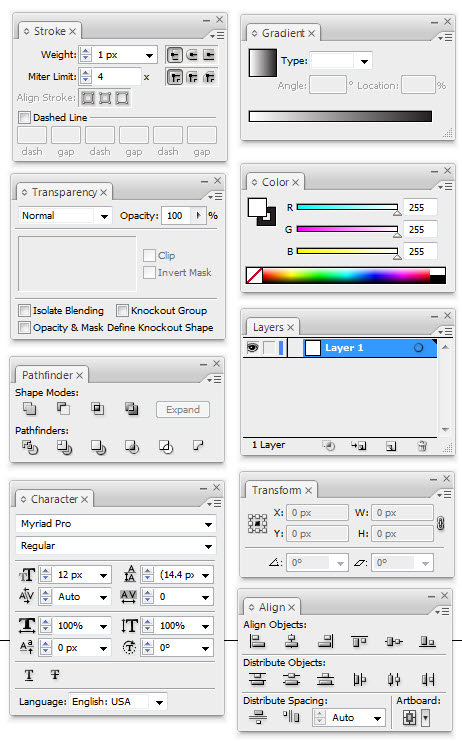
If you are just starting out to learn Adobe Illustrator, then you will really get yourself into a lot of confusions and overwhelmed by all the tools that are presented to you. As a matter of fact, you only need to learn some important tools to get yourself ready for some illustration.

Below are the 14 most important tools that you will be using all the time:



  1. You must first understand well the differences between  the Two Arrows above. One is to select and move an object, while the one is to select an anchor point of an object. You can also use them to scale and modify an object.
  2. The Pen Tool is the most used tool in Adobe Illustrator. You use to draw everything.
  3. Type Tool. You use this to insert text into your illustrations.
  4. Primitive Object Tool, to draw basic shapes such as rectangle, circle, star, and etc.
  5. The color swapping feature. Do understand that every object contains background color + stroke color. The 3 small options below is for you to have more options on how you want to feature the object, either with or without a stroke/background and gradient color (shading).
  6. Stroke Menu. This is to manipulate how your stroke looks like.
  7. Gradient Menu. To create color shadings.
  8. Transparency Menu. To create opacity or alpha color, so that your object can be seen through.
  9. Color Menu. As mentioned.
  10. Path Finder Menu. This is one of my favorite tool. This is to combine or dissect two or more objects. Do experiment with this tool and you will know how useful it is.
  11. Layers Menu. To put your object on above or below another object.
  12. Character Menu. To modify your text.
  13. Transform Menu. To see the details of an object such as the location and size.
  14. Align Menu. Another favorite tool of mine. Use this to make alignment between two or more objects easier.

Read More..

Rabu, 13 April 2016

Top 5 Alternatives Of Facebook Insights Facebook Analytics Tools


 Top 5 Alternatives Of Facebook Insights || Facebook Analytics Tools

Facebook Analytics Tool
If you are admin of any Facebook page,then you take so much interest that how many people like your page,how many people seen your page etc.This is called Facebook insight.Facebook Insight show you full performance of your page.Insight tool aware your page rank and tell you,your page rank is increasing or decreasing acting as analytic tool. .Facebook Insight is set as analytic tool by Facebook team but there are many software and apps are available as a best alternative of Facebook Insight. These analytic tools have extra tools to track the performance of your Facebook pages.I am sharing with you top 5 best alternatives of Facebook insight.So,lets have a look on Facebook Analytic Tools.

1. Agorapulse:


Agorapulse is best alternative of Facebook insight.Best features of Agorapulse are as follow.
  • Page and timeline level analytics overview 
  • Compares performance of your page against other pages of a similar size 
  • Best for community managers and agencies.


2. BlitzMetrics


BlitzMetrics is not only facebook analytics tool,it track full performance of Twitter, YouTube and Instagram with Facebook.Best feature of this tool are as follow.
  • Provide report for specific period of time which you select. 
  • Represent graph reports in many ways.
  • Demographic reporting with PTAT (People talking about this) amongst male/female.


3. Komfo


Komfo is best alternative of Facebook insight as well as track performance of all main social media networks. Good features of this analytics tool are as below.
  • Analyze post individually.
  • Shows performance for the last 30 days for up to 100 posts for the free version of the tool. 
  • Compare your page rank with others as a competitor by scoring. 

4. Postacumen


PostAcumen is best facebook analytics tool which use different analogy.It determine why ups and downs occurs in facebook page insight and how to deal it. Some best features of this analytics tools are given below.
  • Provide full analysis which give good actionable insights.
  • Monitor real-time facebook activity.
  • Analysis photos and show most popular on the top of page. 

5. quintly

quintly is top best facebok insight analytics tool to analyze main social networks like facebook,twitter, Google+, LinkedIn etc.Its best features are as follow.
  • Benchmark your page against competitors to compare performance.
  • Allows you to set automatic reports to be sent to the people within your organization.
  • Allows you to import all your Facebook analytics data to the tool.
Read More..

Senin, 28 Maret 2016

Top 10 Best Voice Recognition Software Tools in 2014


Top 10 Best Voice Recognition Software & Tools in 2014
Top 10  Best Voice Recognition Software & Tools in 2014

One of the most amazing use of technology is speech/voice recognition. The work on speech recognition start in 1950 to 1960 and engineers designed 1st "Audrey" speech recognition system at Bell Laboratories in 1952 which only recognized digits spoken by a single voice. Basically Speech recognition is the translation of spoken words into text and it offers many comforts to its users. Here in this article have discussed voice recognition Software & Tools which could be very useful for many purposes like automatic online typing, speech to text conversion etc. If you do search on speech recognition software then you will find many useful voice recognition software but all of those cannot be used free of cost. So in this article have listed free and paid software which will help you to convert your voice to text easily. In below listed tools some speech recognition app came with many useful options like voice search and automatic voice dialing etc. Below is the list of Top 10 Voice Recognition Software & Tools.

1. Dragon NaturallySpeaking

Dragon NaturallySpeaking is one of the best and most popular voice recognition software. It is best for Windows & Mac. Dragon NaturallySpeaking got 1st position according to 2014 voice recognition review. As it is a paid software but if compare with its amazing and tons of features like (voice commands, web search by voice, accurate dictation and accent support etc) then you can pay for it without any trouble.    

2. Talking Desktop

The 2nd best voice recognition software according to 2014 review is Talking desktop. It is also a useful voice recognition software which offers many useful features and beautiful user interface. This is paid speech recognition software which comes with some useful features like voice commands, web search, voice training , automatic speech typing capacity etc.

3. Dictation Pro

As its name suggest its best dictation software. It is best voice recognition software which can be used free of cost. It is used to type the documents, email and letter by voice. So in short it is one of the best dictation tools which helps to write documents without typing. You just need a powerful microphone in your computer then software could listen your words clearly.

4. eSpeaking

eSpeaking is the best free voice recognition software which helps to command your computer through your voice. It comes with some useful options and you can easily download this speech recognition software free of cost. This application also allow to command other software and tools by voice in your computer like if you want to check your emails then just say "open email" and this program will automatically open your email.

5. Dspeech

Another amazing voice recognition software in our list is Dspeech. It is a free text to speech converter which can turn any kind of text document in to voice mp3 or wav file easily.

6. Realize Voice

It is a popular paid voice recognition software which helps you to reduce the use of keyboard and mouse. This software also adds speech recognition capacity to your computer that can increase your device productivity easily. 

7. Responding Heads

Responding Heads is most useful free program which helps users to command their computers through voice. This application offer lots of features which helps to handle lots of work. So in simple words best voice recognition software to reduce the use of keyboard and mouse.

8. eSpeak

eSpeak is most simple text reader which convert text into speech and allows to save file in .wav format. You can easily download full version of eSpeak free of cost for PC.

9. TTSReader

TTSReader is the best free of cost text reading program which comes with powerful voice recognition system. You can listen any documents or written text in various voices by using TTSReader. It also allows users to record the voice to mp3 or wav files. 

10. ABA English Course

As its name suggest it is an entertaining paid English teaching program which helps users to learn English easily. This is amazing software for those who feel difficulty in learning English. Its mainly design to teach users English easily. This awesome software comes with over than 300 actors voice with oral exercises. 

Read More..

Selasa, 15 Maret 2016

Top 10 Logo Maker Websites for Blog Online Logo Maker Tools


 Online Logo Maker Tools

One of the most important part of any Website is Logo. Mostly people dont focus on this point and run websites and blog without any logo. If we see generically then see every small business company needs a company logo for their products. Logo is a small type of image in which the companys name is written which defines the name of the brand or product. Logo also puts great impression on the visitors or customers. Every Website or professional company has A Specific logo. So we should also make a logo for blog or website. So if you want to design such Great logos for you blog or website then  you need some online tools to make logos. Here in this article have listed Top 10 free Online Logo maker tools. Most important the best feature of below listed websites of Logo Maker Tools can make free logos without paying any penny

1. Cooltext
Cooltext is a free animated graphics online tool to design free logos for  companies and websites. Cooltext offers huge collection of designs so, you can choose your favorite design from the list. For this you need to complete the form and your desired logo will be made automatically.

2. Flamingtext
Flamingtext is a 2nd best logo making site because it is quick and easy Online Logo maker site. Flamingtext offers 250 unique styles so you can easily choose your favorite logo from the list. Even you dont need any designing skills to make logo. Most important new logos are added every week and the site is up to date with new and latest logos.

3. Logoyes
Logoyes is a 3rd best free online professional logo designing website. Logoyes is an easy and fast to use so, you can make your logo in minutes. You can make multiple logos in minutes and edit them at a time and also send them to your friends.

4. Logosnap
Logosnap is another best free online logo maker tool which offers the best custom logo designs to its users. You can get your one-of-a-kind logo in 3 just easy steps. You can also make your custom logo as well as Automatic logos which also available. So you just need to pick your favourite logo and design it. Logosnap is easy and very fast to use.

5. Logogenerator
Logogenerator is a free online logo generator tool to generate your Free logos. You have to choose your niche category from the list and make your logo. 

6. LogoMaker
LogoMaker includes thousands of icons created by a team of designers. You just have to select your icon, change color, add text and than download it.

7. OnlineLogo Maker
OnlineLogo Maker is one of the best website to create logo for your blog. 

8. Logoease
Logoease offers simple design interface which allows you to create your world class logo in just minutes.

9. LogoDesign Engine
LogoDesign Engine is free and easy to create logo for your Site. You can easily select logo template, select fonts, colors and in a few seconds your logo is ready.

10. FreeLogo services
FreeLogo services is so much simple and easy to use. You just enter your text, choose a design, customize your logo and than save and download.
Read More..