Pages

Tampilkan postingan dengan label 14. Tampilkan semua postingan

Kamis, 26 Mei 2016

14 Most Important Tools to Learn in Adobe Illustrator for Beginners

If you are just starting out to learn Adobe Illustrator, then you will really get yourself into a lot of confusions and overwhelmed by all the tools that are presented to you. As a matter of fact, you only need to learn some important tools to get yourself ready for some illustration.

Below are the 14 most important tools that you will be using all the time:



  1. You must first understand well the differences between  the Two Arrows above. One is to select and move an object, while the one is to select an anchor point of an object. You can also use them to scale and modify an object.
  2. The Pen Tool is the most used tool in Adobe Illustrator. You use to draw everything.
  3. Type Tool. You use this to insert text into your illustrations.
  4. Primitive Object Tool, to draw basic shapes such as rectangle, circle, star, and etc.
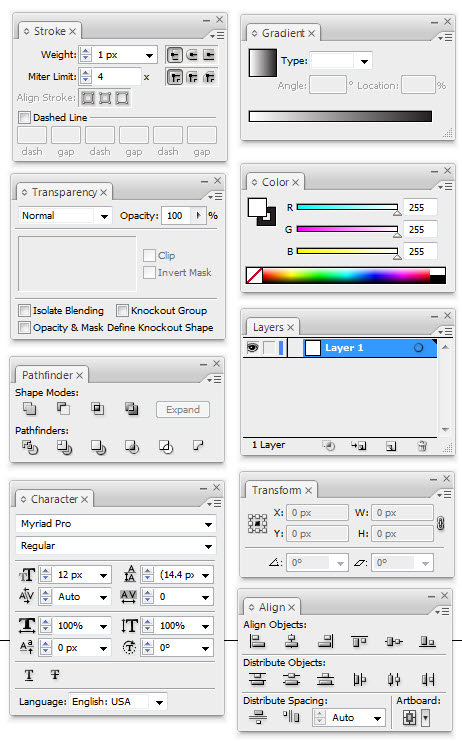
  5. The color swapping feature. Do understand that every object contains background color + stroke color. The 3 small options below is for you to have more options on how you want to feature the object, either with or without a stroke/background and gradient color (shading).
  6. Stroke Menu. This is to manipulate how your stroke looks like.
  7. Gradient Menu. To create color shadings.
  8. Transparency Menu. To create opacity or alpha color, so that your object can be seen through.
  9. Color Menu. As mentioned.
  10. Path Finder Menu. This is one of my favorite tool. This is to combine or dissect two or more objects. Do experiment with this tool and you will know how useful it is.
  11. Layers Menu. To put your object on above or below another object.
  12. Character Menu. To modify your text.
  13. Transform Menu. To see the details of an object such as the location and size.
  14. Align Menu. Another favorite tool of mine. Use this to make alignment between two or more objects easier.

Read More..

Minggu, 03 April 2016

Sony Xperia Z1 Mini Appears Again Will Launch 14 Janaury In China

Sony Xperia Z1 Mini Appears Again, Will Launch 14 Janaury In China

In the excellent product of Sony, one is top ranking and excellent smartphone is Sony Xperia Z1 Mini.Sony Xperia Zi Mini has exclusive features. This device attract customers and has high demand in market. This device is available in Japan as Sony Xperia Z1 F. In others regions this device is known as the Xperia Z1S or Xperia Z1 Mini.Good news about this device is that it will be again available in China in next month.Sony Xperia Z1 will released 14th janury.

See Also:Apple iPhone 5S Specifications
Features of Sony Xperia Z1 Mini:

Some exclusive features of Sony Xperia Z1 are as given below.

  • Xperia Z1 Mini is similar to Sony Xperia
  • Equipped with 4.3-inch IPS display
  • Having resolution of 720×1080
  • RAM of 2GB
  • Storage memory of 16 GB
  • Android 4.2 Jelly bean OS

Price of upcoming Sony Xperia Z1:
Upcoming Sony Xperia Z1 will be expensive wit price of 4099 Yuan or $675 will present in China.As this is available in limited areas so it is costly. Around $400 it will be available in UK and USA.

Read More..

Jumat, 01 April 2016

30 Magazine Submissions in 30 Days June Day 14 30Submissions30Days

Here is the post that started it all! I suggest you go check it out first before you take on the challenge. You can start the challenge at any time and each days post leads to the next day! Here is yesterdays post, #13.


Here is the piece I am sending out for today. Its something I did a couple of years ago for a debt site and have retooled it for the regionals, so theyve never seen it before.

I suggest you get a good system down that works for you. I use Excel and in one tab have all the publications and what they have used of mine (so Im not sending a magazine something theyve already used and wasting their time), in another tab I have it arranged by article so I can see when each was published and how it did, another tab for financial stuff like invoice numbers and amounts, and another tab for my submissions plan.


So here is my offering to the magazine gods today, and Ill keep you updated on how it fares.

#14 15 Ways to Have a Frugal, Fun Day With Kids

And here is your #14 tip/step/help for the month:

Dont forget that some regionals love funny personal essays about daily life as a parent. Readers love these stories they can relate to!

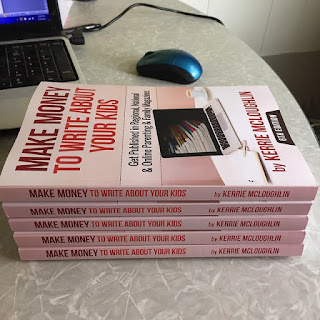
If you want to dust off your ideas and take the challenge with me sometime this summer, comment below and get my book here on Amazon as an ebook or as a print book. My book not only has all the markets you need with contact and pay information, but also embellishes on the tips Im going to be giving you this month to get you going. I recommend the print version (I make the same amount of money either way pretty much) because you are going to want to make notes, cross things out, highlight publications youve worked with, etc.


Read More..