Pages

Tampilkan postingan dengan label blogger. Tampilkan semua postingan

Kamis, 19 Mei 2016

Blogger Writer Wrap Up Posts

Welcome to the blogger/writer edition of the wrap up posts! This was originally posted on my family blog, but it is more fitting here! Lets dive right in!

1. Heres the thing about blogging ...

2. Working at a desk all day is not good for your health!

3. Dont like people? Apply here!

4. No excuses writing: butt to seat!

5. Never be friends with a writer. My poor family; they have no choice!

Read More..

Minggu, 08 Mei 2016

How to ADD Sharing Buttons in Blogger Blogspot Horizontal Vertical Buttons

 Marvellous Social Sharing Buttons Widgets For Blogger

 ADD Sharing Buttons in Blog

Is social media is helpful for blogger in sense of getting traffic.Answer is yes.Its really helpful scenario to get traffic from social media.But question is How to use social media to get traffic on your blog.Simply by post sharing on social media like facebook,twitter,linkedin,stumble upon etc.Its my own personal experience that facebook ,stumbleupon and pinterest are those social media which boost your blog traffic in real sense.Sharing post in Google+ communities boost your blog in UK,USA etc.Next question is how we can share our blog post.It seem too much time consuming.Yeah its all right,but I am sharing with you social sharing widget instead, which provide you quick way to share your post.Todays tutorial is realed to add floating social sharing buttons widgets on blogs.This widget provide you 800+ social sharing buttons to embed on your blog.So,without any delay lets move to learn how to add marvellous social sharing buttons widgets for blogger.

How to add social sharing buttons?

It is very simple and easy to add this widget like others widget, We have posted in blogger tutorial category.There are many methods you will find but all are not work.I am sharing with you most active method to add  800+ sharing buttons which will work definitely.So,follow given below steps.

Steps:

1. Sign into blogger.com
2. Go to >>blogger dashboard>>Layout.
3. In layout tab go to >> add a gadget.
4. A drop down menu bar will appear.Click on HTML Java script.


 Marvellous Social Sharing Buttons Widgets For Blogger


5. Copy below code and paste it in HTML Java script box.


 Marvellous Social Sharing Buttons Widgets For Blogger


<div class="addthis_toolbox addthis_floating_style addthis_counter_style" style="left:120px;top:200px;">
<a class="addthis_button_facebook_like" fb:like:layout="box_count"></a>
<a class="addthis_button_tweet" tw_count="vertical"></a>
<a class="addthis_button_google_plusone" g:plusone:size="tall"></a>
<a class="addthis_counter"></a>
<a href=http://www.anzaq.com/2013/12/sharing-buttons-blogger.htmll rel=nofollow target=_blank style=color:#cbc6c9;>Widgets</a>
</div>
<script type="text/javascript">var addthis_config = {"data_track_addressbar":true};</script>
<script type="text/javascript" src="//s7.addthis.com/js/300/addthis_widget.js#pubid=ra-516ff8e04b04378b"></script>


 6. Click on save.You have done.Now view your blog.You will find floating social sharing buttons widget on your blog as like below.


 Marvellous Social Sharing Buttons Widgets For Blogger

By Editorial Desk:

Social sharing buttons amazingly helps to get traffic on blog in real sense.So,do not more delay to add this marvellous blogger widget on blog and enjoy its benefits.If you have any problem regarding social sharing widgets you may ask by leaving your precious comments.Stay update by our new tutorial.


Read More..

Jumat, 15 April 2016

How to Create a Free Blog On Blogger with Proper Configuration SEO and Layout


Blogger is an online service owned by Google.Blogging is source of online earning by writing post for visitors. Blogger is best services than other novice bloggers with friendly interface.By blogging not only you earn money,you get opportunity to improve your knowledge when you write guest post for your visitors.If you want to make a blog and do not have enough knowledge, then this post is for you.This post will guide you and tell you how to make a free blog,how to configure your blog and full guidance about SEO and layout of blog.So, lets know how to How to Create a Free Blog On Blogger with Proper configuration,SEO and Layout.Follow below steps for every specific task.


How to create a free blog on Blogger:
1). Go to blogger.com

2). Sign in with your g mail account. If you have no any GMail account then sign up to make an account on g mail,then sign in to blogger.com

3). Enter user name or display name which will appear on your blog when you post.

4). Click on "create your blog".

5). Select a “Blog title” and URL for your blog. You can check if the URL you are considering is available by clicking "Check Availability".

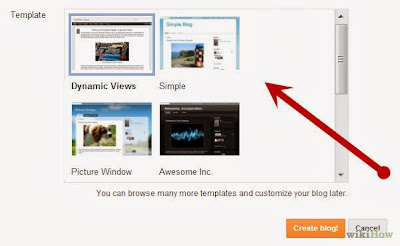
6). Select any template from list of blogger template which will act as basic layout of your blog.

How to Create a Free Blog On Blogger with Proper configuration,SEO and Layout


7). You can download any theme from Internet for your blog and can customize it.

8). After choosing template, click on "start Blogging".

Layout:Bloggers Layout feature is editing feature to edit and customize your Blogger template without any knowledge of HTML or CSS. You can edit and customize the colors, fonts, header and sidebar of your blog with a few clicks of the mouse.

How to configure proper layout on blog:

To customize your blogs layout, go to the Layout tab on most left side of blogs dashboard.How to arrange elements in your template In layout tab you can move elements by dragging, add gadgets and edit elements in templates. 
How to Create a Free Blog On Blogger with Proper configuration,SEO and Layout


Editing elements in your template

You can edit following elements of template.
Navbar: Select the color youd like your Navbar to be.
Header: Add or edit the header of your blog, which includes your blog title and blog description.
Blog posts: Choose the number of posts to display on your main page.
Profile: Edit/add your profile title, About Me description, and location.
Blog archive: Edit/add your blog archive title, display style and archive frequency.


How to add a gadget

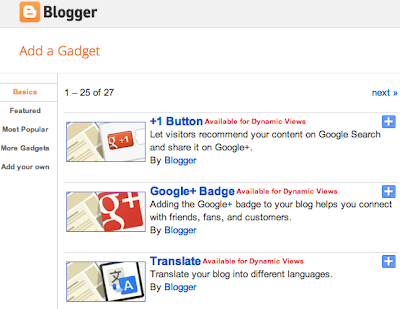
You can add gadgets to your blog page or sidebar by clicking Add a gadget. This will open a pop-up window. Click + in the proper element section to add.

How to add a gadget

SEO(Search Engine Optimization):

SEO is a tool to improve traffic on your blog.Perfect SEO of your blog or website allows your blog to get high rank in search engine.To be get high rank in search engine, your blog have SEO.
12 Ways to Get Traffic to Blog

How to do SEO on Blog:

Below are some tips which will aware you about perfect SEO of your blog.
Alternatives to Google Keyword Planner Tool

Add Original Content:

Pure and original content in blog post is big factor to be high in search engine.Avoid copy paste material in your blogs post.

Use Short URL for blog:

Avoid large URL ans use short URL which will be easily memorable to your daily visitors.Search engine will take long time to search if you have select long URL for your blog.

Interlinking to blog post:

Always interlink old post with new blog post.This is effective way of SEO.

Submit blog in directories:

To more SEO, submit your blog in different directories to have high rank in search engine. Directory Submission List 2014

Keywords:
Keywords is best feature of SEO.Use keyword in blogs post, article, title ,in image description and search deception.

Add Sharing Buttons
Adding social buttons on blog to share blog post on social media.This is big source to get high traffic on blog.
 
Read More..